a demo

Built on
Open MCP standard
OAuth authentication
Inherited permissions
Full audit trail
SOC 2 Type II
A universal plug between AI and your data.
MCP — the Model Context Protocol — is an open standard that lets AI assistants connect to external tools and data sources in a structured, secure way. Think of it as a universal plug: instead of every AI tool building a custom integration with every data source, MCP defines a common language any compliant AI can use to call any compliant tool.
Supper is a compliant tool.
When you connect Supper to an MCP-compatible AI, that assistant can ask Supper questions, retrieve data, and surface answers — all grounded in your semantic model, validated by your accuracy layer, and governed by your existing permissions.

Three connections
One server. Every AI you
already use.
Whether you ask questions in Claude, build apps with Claude
Code, or run agents in your own stack — the same Supper, the
same answers, the same governance.
01 — Claude
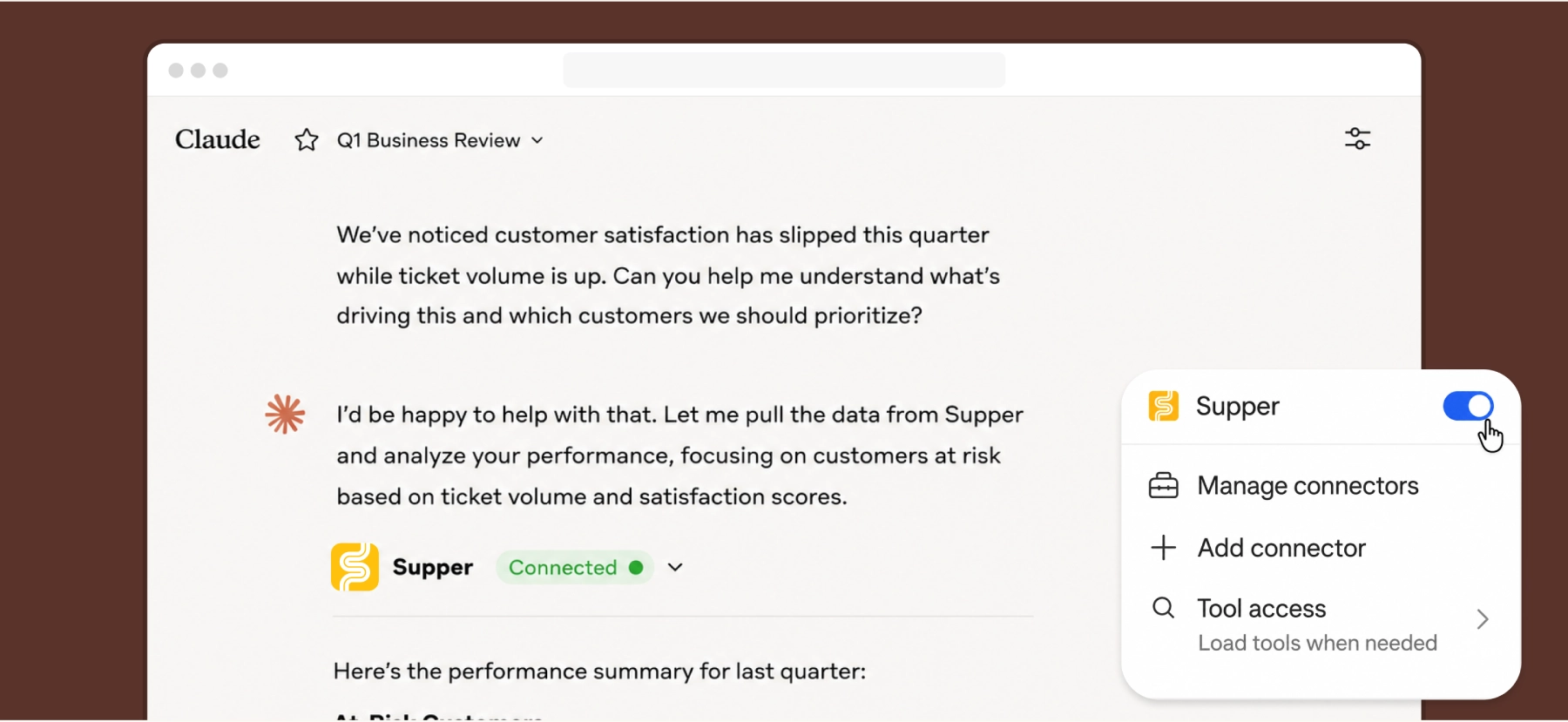
Ask Claude about your real business data.
Two-minute setup. No code. Verified answers inside the conversation you're already having.
Founder or ops lead still pulling numbers by hand.
02 — Claude Code
Build apps on top of verified data.
Query live data from your dev session. Validate the shape, then harden the working query into your endpoint.
For developers & data engineers
03 — Any MCP tool
Plug Supper into any agent stack.
If a tool speaks MCP, it speaks Supper. ChatGPT, Glean, LangChain, CrewAI, your internal Slack bot — all the same.
For engineers building agents
Ask your AI assistant about your actual business data.
If you're using Claude, connecting Supper takes two minutes. Once connected, Claude can answer questions about your live business data - not a hallucinated approximation, but a verified answer pulled through Supper's semantic model.
Ask Claude "what was our net revenue retention last quarter?" and it calls Supper. Supper runs the query. The answer comes back accurate, auditable, and calculated exactly the way your team has defined it. You never leave the conversation.
Ask data questions inside Claude, without switching tools
Answers grounded in Supper's semantic model - not a best guess
Chats appear in app.supper.co so nothing is lost
Governed by your existing Supper permissions
.svg)
01
Open Claude → Customize →Connectors
Find Supper in the connectors list.
02
Connect and
authenticate
One-click OAuth — no API keys or config files.
03
Start asking
questions
Ask Claude anything about your Supper-connected data.
.svg)
Build apps on verified data — without writing the data layer yourself.
If you're building with Claude Code, Supper's MCP is already available as a connected tool. You can query your live business data directly from your development session — test questions in plain English, see real results, and harden working queries into your application code.
The workflow: ask Supper a question in plain language, confirm the data looks right, then build your endpoint around the exact query that works. No schema guessing, no test fixtures, no mocking.
Query live business data directly from your Claude Code session
Validate data shape before writing a single line of backend code
Production-ready: handles polling, SSE, and parallel queries
Token auth managed by Claude Code — nothing to configure
Plug Supper into any AI stack that speaks MCP.
Supper follows the open MCP standard. If a tool supports MCP, it supports Supper. Internal Slack bots, sales automation agents, custom reporting tools — any of them can query Supper and get verified business data back.
One protocol, every framework - no per-tool integration
Permissions travel with the call - agents inherit user access
Same semantic model and accuracy layer the UI uses
Audit trail captures every agent call alongside human queries
.svg)
What Supper exposes over MCP
ask
Ask any data question in natural language. Returns a verified answer grounded in your semantic model.
// use when: you want a plain-language answer to abusiness question
get_pipeline_
status
Check whether a query is still processing or has returned data. Poll this after ask for complex queries
// use when: the ask call returns "processing" status
get_answer_
rows
Retrieve structured row data from a completed answer - columnar format, ready to act on.
// use when: you need structured data to display,transform, or pass downstream
get_context
Retrieve semantic model context — metric definitions, entity descriptions, available tables.
// use when: you need your agent to understand ametric before asking about it
Works With


.svg)
.svg)
.svg)
.svg)
.svg)

Your permissions travel
with your data.
When an AI agent calls Supper through MCP, it operates within the same permission boundaries as the authenticated user. If a user can't see a table in Supper, an agent calling Supper on their behalf can't see it either.
Role-based access enforced at the query level — not just the UI
OAuth — no long-lived credentials or API keys at runtime
Every MCP tool call logged in Supper's audit trail
No data cached or stored outside your Supper environment
SOC 2 Type II — same coverage as the core platform
Agent calls Supper via MCP
Using the authenticated user's OAuth token.
Supper checks user permissions
Schema, table, and column-level access enforced at query time.
Query runs against live data
Only permitted data is queried — restricted fields are never returned.
Answer logged in audit trail
Who asked, what ran, what returned — full record.